
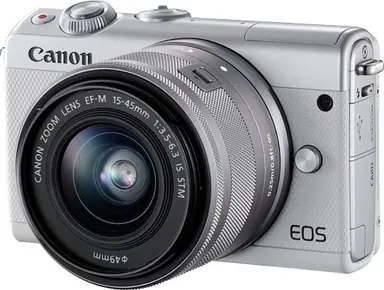
Canon EOS M100
- Type
- Mirrorless
- Mount
- Canon EF-M
- Sensor format
- APS-C
- Resolution
- 24.2 MP
- Released
- October 2017
Specifications
Sensor and image
- Resolution
- 24.2 MP
- Largest image size
- 6,000 × 4,000 px
- Sensor format
- APS-C
- Sensor size
- 22.3 × 14.9 mm
- Sensor type
- CMOS
- ISO range
- 100 to 25,600
Autofocus
- AF system
- Dual Pixel CMOS AF; Face+Tracking, Smooth zone AF, 1-point AF
- AF points
- 49
- Subject detection
- People
- AF low-light limit
- -1 EV
Shutter and burst
- Mechanical shutter
- Yes
- Fastest shutter speed, mechanical
- 1/4000 s
- Slowest shutter speed
- 30 s
- Flash sync speed
- 1/200 s
- Burst rate
- 6.1 fps
Viewfinder and display
- Viewfinder
- None
- Screen
- 3 in, 1.04 million dots
- Screen type
- Tilting
- Touchscreen
- Yes
Body and battery
- Dimensions (W × H × D)
- 108.2 × 67.1 × 35.1 mm
- Weight with battery and card
- 302 g
- Body-only weight
- 266 g
- Battery
- LP-E12
- Shots per charge (screen)
- 295 shots
Storage and connections
- Card slots
- SD
- Wi-Fi
- IEEE 802.11b/g/n
- Bluetooth
- Bluetooth Ver. 4.1 (Bluetooth low energy technology)
- USB
- Digital terminal (Hi-Speed USB compliant): Mini-B
- HDMI
- HDMI OUT terminal: Type D
Market and price
- Announced
- August 29, 2017
- Released
- October 2017
Features stated by the manufacturer
- 180 degree flip-up touch screen
- Built-in pop-up flash
- Built-in time-lapse movie mode
- Creative filters
- NFC
- Self-portrait mode
- Touch shutter
Manufacturer data: sg.canon, canon.com.au
Last checked: October 25, 2026 (against the manufacturer data) · How we check
Size and weight
- Width × height × depth
- 108.2 × 67.1 × 35.1 mm
- Weight with battery and card
- 302 g
- Weight, body only
- 266 g
Manufacturer data: sg.canon, canon.com.au
The front view is schematic, only width and height are to scale.
Check the shutter count
The tool reads the counter from Canon photos. The Canon EOS M100 has not been checked with test files. Open the tool